
The first experiment came together in about 25 minutes. This one took more steering, setup, and checking along the way. I want to stay with those less exciting parts for a bit, because they help explain what it actually takes to turn an AI-generated solution into something I can use.
I wrote a letter for a small group of family and friends. I wanted to share some photos of my family at the top. I use Notion because of how easy it can be to share these types of notes with multimedia attachments. I wanted the photos to be decorative and intuitively viewed, so I naturally thought of a swipeable gallery, i.e. an image carousel or image slider.
But Notion doesn’t have this built-in. It has a Gallery View, which is not quite what I’m looking for. 6 photos would all display on the page at once and dominate the whole letter. I Googled this specific pain point and found that I wasn’t the only one looking for this feature. First thing I looked at were already-built solutions.
I tried Powr.io first. It worked, but the free tier only allowed four photos. It’s also not swipeable.
Common Ninja was swipeable and had a free tier that allowed five photos, but it was trying to upsell me at every turn. It also had this annoying banner that pops up at the bottom upon load.
I also found a couple Reddit threads describing custom approaches, but they were outdated and too involved for such a small ask.
At this point, I can choose a less elegant Notion layout, upload fewer photos, or give up on the carousel entirely.
But if you’ve been following along in this series, this is yet another tiny opportunity ripe for AI disruption.
Microscopic Viable Product
Behind all of these solutions is that Notion allows for custom page components, but they have to live somewhere apart from Notion.
This means that the carousel needs to be a separate web page hosted by a separate service. Notion’s job is only to place that page inside the note through an embed block. The outside service has to handle the rest: accepting the uploaded photos, storing them somewhere, rendering the swipeable interface, and exposing a public URL that Notion can load.
Powr.io and Common Ninja were not just giving me a carousel. They were giving me hosted widget infrastructure, storage, an editor, billing, branding, and all the machinery required to make that service available to many users. I did not need most of that, nor did I appreciate the free-tier limitations.
Once I understood the problem in this way, it was easy to see the potential for a minimal custom solution.
Here is what I saw in my head:
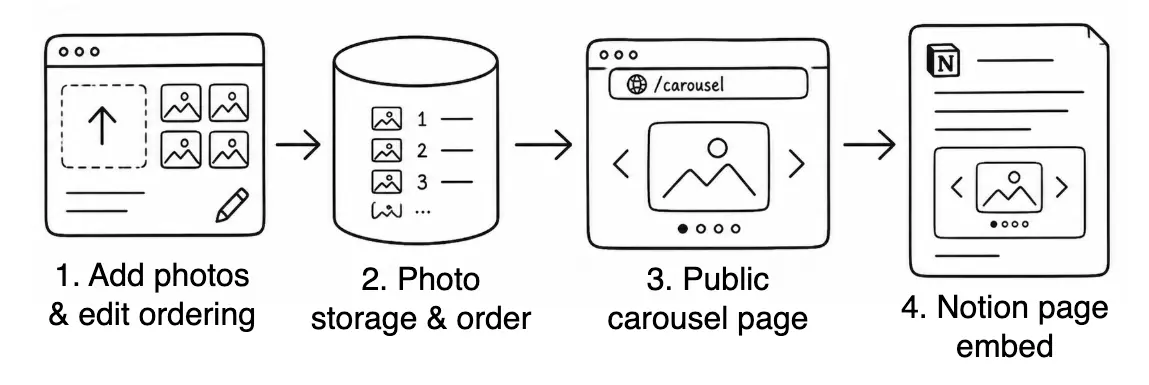
- The upload/edit interface, where the photos enter the system and where the photos are ordered.
- Storage holds the uploaded photos in the desired order.
- The public carousel page reads from storage and renders the photos as a swipeable gallery at a URL.
- Notion embeds that public carousel page inside the note.
I threw a pretty loose prompt for this at Codex. On hard mode: using Codex Remote on my phone while I helped my wife with lunch. Not really a one-shot candidate, but at least Codex could get it started. I could tell that the road towards a working solution was bumpy and had twists and turns that required some human navigation. I will spare you the play-by-play (if you really want to know, just ask), so I can tell you where we landed.
Codex picked all of the technology for me, wrote the code, and gave me instructions on how to wire things together, the parts it couldn’t practically automate (at least at the time of this writing… who knows how this will age). Below is how my nebulous idea above materializes into reality.
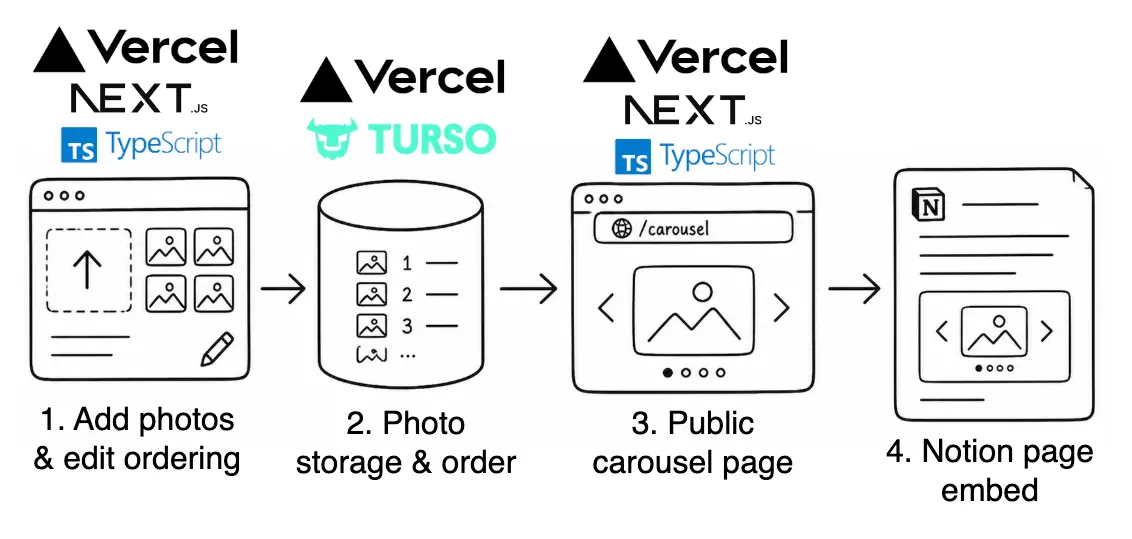
- Add photos & edit ordering: This is the small interface I use to create a carousel, and I went with the easiest vibecoded solution: a web page. It was built with Next.js and TypeScript, then hosted on Vercel. Next.js provides the structure for the web app, TypeScript is the language the app is written in, and Vercel is where the app runs (I am using its generous free tier).
- Photo storage and order: This is split into two pieces behind the scenes. Vercel Blob stores the actual photo files. Turso stores the metadata: which photos belong to which carousel, what order they should appear in, and which secret edit link is allowed to change them.
- Public carousel page: This is another page served by the same Next.js app, written in Typescript hosted on Vercel. It reads the carousel metadata, loads the photos from storage, and renders the clean swipeable gallery at a public URL.
- Notion page embed: Nothing new here. This is just where it all lands.
There was still plenty of manual work on my part. I still had to create the GitHub repo, connect it to Vercel, attach Blob storage, create a Turso database, copy the right credentials into the right environment variables, and redeploying on each substantial iteration.
Then there was the ordinary checking work: open the deployed app, upload a few photos, publish the carousel, look at the public page, notice that the images didn’t fit properly, go back and forth on the fix, and finally embed it into Notion to see it all come together.
Codex wrote most of the code, but I still had to move the project through the other parts of the process: accounts, hosting, credentials, deployments, and of course, the question of whether or not this thing looked and behaved as I expected.
Anyway, after all of that, this is how the finished product looks:
You can also see the live demo versions of these videos over here.
Some Housekeeping
I am sharing the code, though I don’t believe this is all that important anymore. The useful parts of the code are probably the little tweaks that made the carousel behave properly in practice, especially getting images to fit. If someone wants to make their own version, the repo may be enough of a starting point.
What’s now more important than the code itself is developing the intuition to recognize these opportunities for software, and the skill of prompting AI to efficaciously converge onto a solution, even if sometimes you conclude that it’s a dead end. Either way, I believe there is ample opportunity to learn even with all of this AI-assistance.1
As for the actual hosted carousel service, I am more hesitant to share it as a public tool. It is running on free-tier infrastructure, and I do not have a good sense of how many people would try it and upload photos (which I would have full access to) and turn this little workaround into something much more involved. If this turns out to be a real enough need, maybe I will clean it up and host the service properly for a wider audience.
Conclusion
This is still not the fantasy where I speak the wish into my phone and out pops the finished product. Choosing the commodity technologies and writing the code was handled by AI, but the whole process still required a human for setup, debugging, credentials, deployment, and my visual judgment.
But even with all of that, the distance between wanting the thing and having the thing is much smaller than it used to be. I did not want to subscribe to a full product suite just to decorate a personal note. I needed a little bit of software in exactly the right place.
This is why I keep circling this idea. Before, this problem would have been too small to warrant such effort. Notion was still the place I wanted to write and share the note; the custom software only filled in the narrow gap.
Footnotes
-
There is probably a separate post here about learning. I suspect many of us learn better by starting with a concrete whole and then filling in the details as needed, rather than collecting disjointed techniques in advance. In this case, I started with a real, concrete, high-level concern before I had any clear idea how it should be implemented or what technologies to use. AI helped me quickly move toward a solution, but I also learned a lot in the process, just not in the conventional bottom-up, language-and-syntax-first kind of way. ↩