
In the previous post, I turned a small annoyance on my Android phone into a working text-to-PDF tool in about 25 minutes. Here, I want to slow down and unpack the thinking that made it possible. Some of it happened almost automatically, which makes it easy to skip over when telling the story. I’ll try to make those mental moves visible enough that you can start recognizing small, solvable software gaps in your own life.
I realize that when I try to talk about “seeing the shape” of a software problem to a non-software-engineer, it can come off as kind of esoteric or mystical. Really, it’s just a mental muscle1 that I’d exercised throughout my career, in environments where this kind of intuition is so commonplace that we didn’t really have to try that hard to explain it to each other.
The great part about AI-assisted coding for these little personal projects is how much I can do while staying at this intuitive level (in the realm of ideas) instead of getting deep into the technical weeds.2 I can just share the prompting that I did and you can copy them and tweak them to your liking to quickly produce some software of your own, but that would skip the actual lesson of this post. This example has a pretty clear path to victory, but (as you’ll find later in this series) not every problem does. If you want to use these tools well, you still need to develop a basic understanding of what is hiding inside the messy parts, or you can waste a lot of time and tokens chasing the wrong solution.
I saw this in two parts.
- The Feature Itself: the behavior I wanted my phone to have: take selected text and turn it into a PDF.
- The Build Pipeline: the machinery required to turn that feature code into an installable app running on my phone.
Let’s drill into them one by one.
The Feature Itself
I found this to be straight-forward and easily one-shottable. I started with this basic model in my head:

- I highlighted some text
- ? - (something needs to happen)
- I get a PDF from the selected text
Then adding little more detail:

- I have used enough Android apps to notice that some of them can add an entry to my text selection menu, as Adobe Acrobat did in the previous post. But I don’t even need a full app that loads up onto the screen like that, because I’m also certain that I’ve used apps that simply add a menu item or a widget, so I can keep this similarly minimal. This means I just need an app that adds a text-selection menu item and nothing else.
- Converting text to PDF is so commonplace, I was fine with whatever the agent decided was sufficient. Honestly, I cared so little and trusted that this has been solved many times over that I didn’t even look at what it picked. It seems to be working just fine.
And then the final product, where AI took it the rest of the way.

This is simply a higher-level view of the flow of the code. It isn’t very interesting to me anymore so I didn’t try to spruce up the diagram (if you are interested in the code, you can take a look yourself here). It is simply here for the sake of completeness, to show how things landed in real code. No need to learn what all of this means right now. In terms of the intuition required to start prompting, the previous two levels were all that I needed.
The Build Pipeline
This is where I got a little more ambitious. It’s not as straight-forward as the feature. I have barely any experience with building Android apps, but I have built enough other kinds of software that I have a general sense of what’s involved. And I wanted to see how close I can get to one-shotting this as well.
I started with this basic model:

- I have the feature code
- ? - (something needs to happen)
- I can use this feature on my phone
Then adding a little more detail, pulling from my experience with building software:

- The feature code needs to live inside some kind of Android-shaped project so that the tooling recognizes it as an Android app.
- This project needs to build and compile the code, then package it up into an installable file.
- I need to deliver the installable file to my phone.
And this is how AI filled it all in:
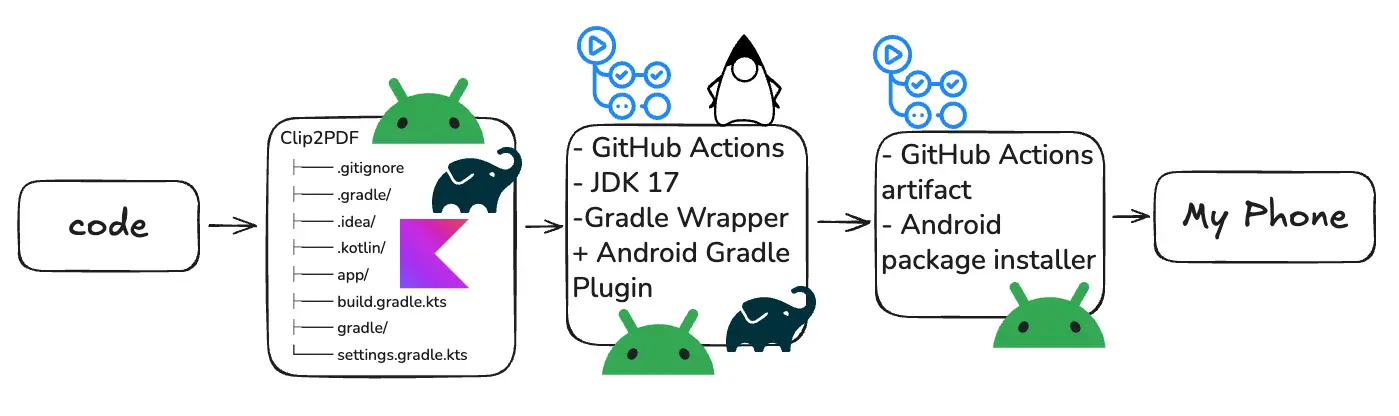
Imagine working with all of that by hand… Again, this is simply for the sake of completeness. You need not worry about these details to get a working solution. The great part about this is that you can interrogate your agent’s choices as you’re building. You can learn the details you want to learn on the fly, in the context of building something you find fun or useful.
My Prompts to ChatGPT
Trying to map out and write about the intuitions above took so much more time and effort than how they happened in my head. It took only a few moments for all of that to click and then it’s off to the races. And you’ll see below, the prompts are quite simple. They are distillations of all the above, but they turned out rather casual and human (i.e. not very technical). I am skipping the full responses because they are pretty wordy and would slow the post down, but you can see the full ChatGPT session here.
This was how all the intuitions around the The Feature Itself was distilled into a prompt. I started with:
how quickly can i get this feature? I have text I want to select in my Android Chrome browser (or really any text) package it into a PDF. nothing pretty, just very straightforward and utilitarian
It told me that we can indeed stand this up very quickly and gave me some details.
For The Build Pipeline piece, I followed up with:
can i nearly one-shot this with Codex such that it can be coded and deployed to my phone without me needing to intervene at all (e.g. setting up my own android dev env, building, etc?)
I used “nearly” because I knew there were some steps that aren’t clean enough to automate yet. Precise though probably not necessary for the prompt. This is just what naturally came out in the moment.
But it agreed that the coding agent could take me most of the way there and listed the manual steps.
give me a name3 for this project and a prompt for Codex
And from here, I set up a Github repository for it with the name it gave me (“Clip2PDF”, not that great of a name, but I was saving my precious mental bandwidth to see this all the way through end-to-end, not get hung up on something so trivial), pointed Codex at it, and copy-pasted the generated prompt into Codex.
This is where rubber meets the road. In the same spirit of keeping this post in the realm of ideas and intuition, I won’t expound on the technical details here. If you want to dive into it all, you can see the actual Codex conversation here.
But I will mention that there were couple points of steering to help it along. I find that these coding agents can be quite eager to adhere to certain constraints, like “DO NOT INSTALL ANYTHING ON MY MACHINE” when I didn’t mean that so strictly. I did a couple of manual things like allowing it to install an older version of Java on my machine as required instead of endlessly trying to find a workaround, though it was amusing to watch it try for a bit.
Starting with a Question Mark
Both halves of this problem started the same way: I have this, I want that, and something needs to happen in between. I filled in what I knew and asked the AI to help with the rest.
Experience helped me recognize what was likely to be easy and where to steer. You can start building that intuition with a small annoyance of your own. Describe the result you want, sketch the steps you can see, and ask about the gaps. Each attempt gives you more to draw on next time.
Footnotes
-
I think everyone has this ability in at least a rudimentary form. Consider the number “1”. You might picture the written symbol
1, the word “one”, or one apple on a table. But you also understand that none of those things is the concept itself. They are representations of it. Software thinking uses a similar move: you learn to look past the visible and ask what underlying shape, rule, or operation it represents. Programming, software architecture, and advanced mathematics are more developed versions of this same basic capacity. I’ll write more about this another time. ↩ -
It helps that I’m a team of one, building for myself. I know the annoyance firsthand and can judge the result by using it, so much of the product and design thinking can happen informally in my head. Building for other people requires making those assumptions explicit, understanding needs beyond my own, and working through competing expectations. AI can help with that process, but the human judgment involved is still substantial. ↩
-
“There are only two hard things in Computer Science: cache invalidation and naming things.” - Phil Karlton ↩